Twitch
 Followers
 YouTube
 Likes
 Subscribers
 Kick
 Followers
How to Get More Viewers on Twitch: 12 Tips for Small Streamers
Small channel, empty chat? These 12 strategies help new Twitch streamers get found, keep viewers watching and turn first-time visitors into a community that comes back.
 Drew Caldwell

On this page
- How Viewers Find Streams on Twitch
- 1. Pick Games With a Good Viewer-to-Streamer Ratio
- 2. Set a Regular Schedule and Stick to It
- 3. Prioritize Audio Quality
- 4. Optimize Your Profile and Panels
- 5. Use Relevant Tags
- 6. Clip Your Best Moments on Twitch
- 7. Promote Your Channel With Short Videos
- 8. Collaborate and Raid With Other Streamers
- 9. Stream Long Enough to Be Found
- 10. Host Unique Events
- 11. Talk to Your Chat
- 12. Start a Discord Server
- How to Read Your Twitch Analytics
- Twitch Milestones to Aim For
- Twitch Viewer FAQs
• Choose games with plenty of viewers per live channel instead of the biggest titles.
• Stream on a fixed schedule and fix your audio before anything else.
• Fill in your profile and panels, and use specific tags instead of vague ones.
• Share clips on TikTok, Reels, Shorts and X, and team up with other streamers through collabs and raids.
• Check your analytics after every stream and keep improving what works.
Twitch has millions of channels, and most beginners go live to an empty chat. The good news is that a few smart habits make a big difference. These 12 strategies show you how to get more viewers on Twitch: get found, keep people watching and turn first-time visitors into regulars.
How Viewers Find Streams on Twitch
Most people find new channels by browsing a game or category. Twitch recommends channels to each user, but the biggest channels in a category still tend to show up first. That gives large creators even more visibility, so small channels need to choose where and how they go live carefully.
1. Pick Games With a Good Viewer-to-Streamer Ratio
One of the biggest mistakes new streamers make is picking the most popular games. If your channel has 10 followers and you stream Fortnite or Valorant, you are competing with thousands of established creators. You end up at the bottom of the category pages, where almost nobody scrolls.
A game with almost no audience does not work either, because nobody is there to find you. Look for the middle ground: games with plenty of people watching but relatively few live channels. Compare the audience in a category with the number of live channels at the same time. The bigger that ratio, the better your chances.
2. Set a Regular Schedule and Stick to It
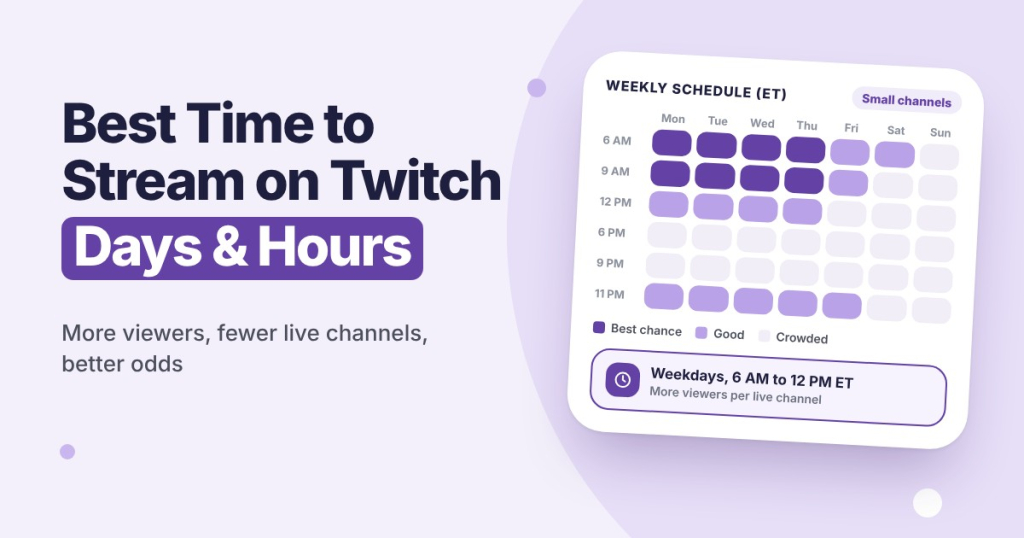
Consistency builds trust. When people know when you are live, they can plan to watch and bring friends along. Three hours every Tuesday and Friday usually works better than random sessions every day. Not sure which hours to pick? Our guide to the best time to stream on Twitch shows which days and hours work best and how to find yours.
3. Prioritize Audio Quality
A good-looking stream makes a strong first impression, but bad audio makes people leave. They will put up with average video, not with background noise, a muffled mic or game sound drowning out your voice.
A decent USB microphone does not have to be expensive, and it is one of the easiest upgrades you can make. Once your audio is sorted, a better webcam is the next step.
4. Optimize Your Profile and Panels
First impressions count. When someone opens your channel, your profile decides whether they stay or leave. Fill in every field with a short bio that explains what you stream, your schedule and what makes your channel different.
Add panels below your stream with your schedule, upcoming events, rules and links to your other social channels, so new viewers know how to follow along.
5. Use Relevant Tags
Tags help viewers find streams they care about. You can add up to 10 tags, and each one is a single word or phrase without spaces, like Cozy, Speedrun or Beginner. Skip vague tags such as Fun or Gaming, because thousands of channels use them. Pick tags that describe your style, your language and what makes your stream different.
Check which tags successful streamers in your category use, then test different combinations over a few streams and watch how your discovery numbers change.
6. Clip Your Best Moments on Twitch
Every great moment can become a clip. Use the clip button in the Twitch player (or press Alt+X), and let your viewers clip too. Mark your best clips as Featured on your channel. Twitch shows popular and featured clips in its scrollable discovery feed, so a good clip can reach people who have never seen your channel.
Use the StreamerPlus Twitch Clip Downloader to download and save your best clips.
Want your channel to look more established when new viewers arrive? Some streamers start with a small boost and buy Twitch followers to get past the empty-channel stage faster.
7. Promote Your Channel With Short Videos
Short videos are the fastest way to grow outside Twitch. Turn your best moments into vertical clips for TikTok, Instagram Reels and YouTube Shorts, add a hook in the first seconds and use hashtags for your game and style. Post regularly and link your Twitch channel in your bio, so people who like a clip can find you live.
8. Collaborate and Raid With Other Streamers
Building relationships with other creators in your niche is one of the most reliable ways to grow. Collaborations and co-streams put you in front of each other’s audiences, and both channels gain new followers. Twitch’s Stream Together feature lets up to six creators go live together, and Shared Chat merges everyone’s chat into one. Raids work the same way: at the end of your stream, send your viewers to another creator, and many will return the favor. Support other small channels, and they are more likely to support you.
9. Stream Long Enough to Be Found
Very short sessions give people little chance to find you in the directory. Many small creators find that 3 to 4 hours is a good balance between being visible and keeping your energy up. Going longer can work too, but only if you stay consistent and keep the quality high.
10. Host Unique Events
Special events give people a reason to tune in. Try charity streams, milestone celebrations, viewer challenges or themed streams. Announce them a few days ahead on your socials and Discord, so your community can make plans and invite friends.
11. Talk to Your Chat
The biggest reason people stay is you. Greet everyone who says hello, read messages out loud and ask questions, even when only two people are watching. When chat is quiet, talk through what you are doing and why. New visitors decide within seconds whether a stream feels alive.
12. Start a Discord Server
A Discord server keeps your community connected between streams. Use it to announce when you go live, share clips, plan events and chat with your regulars. It turns one-time visitors into people who keep coming back.
How to Read Your Twitch Analytics
After every stream, check the Stream Summary in your Creator Dashboard to see which games, times and segments worked best. Here is what each key number means and what to do with it:
| Metric | What It Tells You | What to Do With It |
|---|---|---|
| Average concurrent viewers | Your typical live audience size | Track it week over week. Steady growth is the goal |
| Peak viewers | Best single moment of the stream | Check what you were doing at that moment and do more of it |
| New followers per stream | How many viewers converted to followers | Low numbers mean people enjoy the stream but see no reason to follow. Add a follow reminder and clear panels |
| Chat messages per stream | Engagement quality, not just viewer count | Few messages with decent viewers means you need to talk to chat more |
| Unique viewers | Total different people who dropped in | Much higher than your average viewers means people are not staying |
| Hours watched | Total viewing time across all viewers | Divide by unique viewers to get the average watch time |
Twitch Milestones to Aim For
It helps to know what you are working toward. Here are the main Twitch milestones and what they unlock:
| Milestone | Requirements | What You Unlock |
|---|---|---|
| Twitch Affiliate | 25 followers, 4 hours streamed on 4 different days and an average of 3 viewers in 30 days | Subscriptions, Bits, ad revenue and payouts |
| Twitch Partner | An average of 75 viewers, 25 hours streamed and 12 broadcast days in 30 days, then apply | Verified badge, more emote slots, priority creator support, guaranteed quality options for viewers and access to the Plus Program for a higher sub revenue share |
| Monetization for all (since May 2026) | Eligible streamers in good standing | Earn Bits and subs before Affiliate, withdraw once you reach Affiliate |
Building an audience takes time. If you want your first streams to feel less empty while you put these tips into practice, some streamers buy Twitch viewers as a small starting push. It works best on top of good habits, not as a replacement for them.
Twitch Viewer FAQs
Quick answers about growing your viewer count.
01How many viewers do you need to make money on Twitch?
Not many. Affiliate only asks for an average of 3 viewers, and since May 2026 eligible streamers can earn Bits and subs even earlier. The full requirements are in the milestones table above.
02Why does my Twitch stream have 0 viewers?
Usually because you stream a very crowded game, go live at random times or never promote your stream outside Twitch. Pick a category with more viewers per live channel, keep a fixed schedule and share clips on social media.
03What is a good viewer count for a small streamer?
An average of 3 to 10 viewers is a solid start for a new channel. Focus on growing your average week by week rather than on single peaks.
04How long does it take to grow on Twitch?
Usually months, not weeks. Most small streamers who grow keep a fixed schedule for several months, share clips every week and track their average viewers month by month.
Drew Caldwell is a consultant, researcher and editor-in-chief of the StreamerPlus blog. His work focuses on social media, marketing and digital strategy, using data analytics to help creators understand platform algorithms and grow their audience.