Twitch
 Buy Twitch Followers
 Youtube
 Buy YouTube Likes
 Buy Youtube Subscribers
 Buy YouTube Watch Hours
 Kick
Kick Buy Kick Followers
 Convert Twitch Bits to USD
 Download Twitch Clips
 Download Twitch VODs Instantly
 Kick VOD Downloader
 Kick Clips
 Find Channel ID
 Best Time to post on youtube
 Is YouTube Down?
 YouTube Giveaway Picker
 YouTube Money Calculator
 YouTube Restriction Checker
 YouTube Subscriber Count
 YouTube Tag Generator
 YouTube Thumbnail Downloader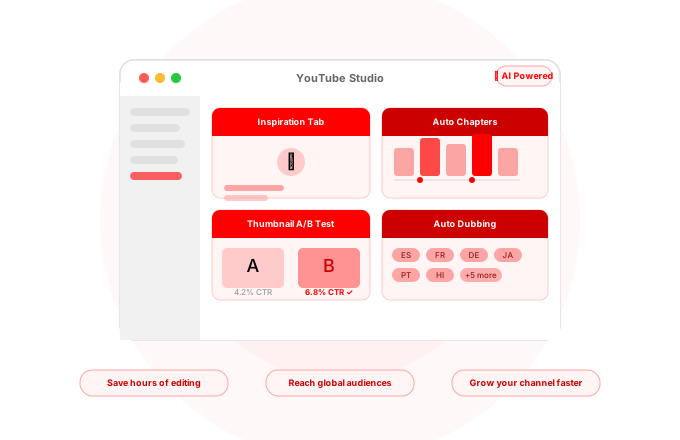
Article Summary
YouTube has been stealthily assembling what could become one of the strongest AI toolkits among creator platforms – and most creators aren't even making use of them. In this guide, we have taken a look at each AI feature that YouTube has introduced into YouTube Studio. We've started off with the Inspiration Tab that helps you get personalized video idea suggestions based on your own content and then progressed through Thumbnail A/B Testing, where traffic chooses the better performing thumbnail for you; and Auto Dubbing, which ensures that your video gets shown in other languages without any extra effort from you.
YouTube has built one of the best collections of artificial intelligence tools within YouTube Studio to date but not many creators utilize them to their fullest. However, it’s an important aspect to consider because the tools mentioned below will help you optimize your content, increase the number of clicks, boost watch time, get more views, increase the number of countries where your content gets distributed, etc.
In other words, they’ll be helping you grow. Here is a complete list of the features and ways on how to start using them right now.
The Inspiration Tab – No More Lack Of Video Ideas!
The Inspiration Tab became one of the most valuable tools to use on YouTube back in 2025 and since then it helped thousands of creators generate great ideas for the upcoming videos. The way it works is pretty simple. All of the features combined with AI technology allow you to get personalized video ideas.
This is not just another “top trending videos” kind of list. Instead, this tab will analyze comments and trending topics related to your niche and provide you with some unique ideas. In other words, all of those ideas will be created according to what your audience is interested in.
As the story says, one creator known as Sambucha (he has over 10 million subscribers on his channel) had tried to use the Inspiration Tab and found out that it recommended him buying products that looked absolutely fake and unrealistic. So, Sambucha decided to follow the suggestion and bought the product that looked like a giant gorilla. To his surprise, it was real and he had to film himself using the sofa. In a few months after that video, the video gained nearly 7 million views!
How to access it: Go to YouTube Studio -> Content -> Inspiration tab.
A/B Test Thumbnails — Let Data Decide What Wins
Thumbnails play the most critical role in your CTRs. Just a couple of percentage points of difference in CTR can have exponential impact in the long run – a video with 6% CTR instead of 4% CTR will attract approximately 50% more views over time with the same impressions.
With YouTube’s new Test and Compare feature, you are able to upload two different versions of your video’s thumbnail and compare performance with real traffic. In the end, the winner gets automatically served more impressions thanks to machine learning algorithms used by YouTube.
It’s like taking all guessing out of the equation because you don’t have to guess what people would click anymore – just test it with your actual audience and see. This tool ranks up among the most advanced tools released for YouTubers by AIR Media-Tech and you can use it right from YouTube Studio.
How to use it: Go to YouTube Studio → Content, select any video of yours, scroll down to the thumbnails, and look for Test and Compare button. Then choose two different thumbnails and wait at least for a week before analyzing the results.
If you wish to analyze thumbnails performance for ideas and inspirations prior to creating your own thumbnails, feel free to use our free YouTube Thumbnail Downloader that allows pulling thumbnails from any video on YouTube with a single click.
Auto Chapters – Make Your Videos Searchable & Watchable
YouTube’s AI automatically analyzes your video’s structure and separates it into labeled chapters with time stamps. As a result, your video receives clickable chapters in the video progress bar, which show up as separate jump links in Google search results. This means that people searching for a sub-topic from your video can immediately get to the exact point that interests them without watching the entire video.
There are two benefits of using auto chapters. First of all, it improves your watch time because it allows viewers to navigate to specific parts they are interested in instead of closing your video. Secondly, each chapter adds an extra keyword to your video’s keyword data in YouTube’s index.
If you have a good structure of your videos (multiple topics discussed), then it is likely that YouTube’s AI will do a pretty good job of labeling video chapters. Alternatively, you can add chapters manually by specifying timestamps in video description.
How to use it: Go to YouTube Studio → Content → Edit Video → More Options, and make sure Allow automatic chapters is turned on.
Auto Dubbing — Connect to a Global Audience Effortlessly
Auto dubbing technology is now live for all creators earning money with their YouTube channels in the YouTube Studio interface. AIR Media-Tech It translates and dubs your video content in several languages including Spanish, French, Italian, German, Portuguese, Japanese, Indonesian, Hindi, and English with others coming soon.
The quality of translation has become so much better compared to the beta version. It still might feel machine generated in some languages but the usefulness of this feature should be obvious to you. A video that does well in English can instantly expand to another audience in Brazil, Japan, Germany, etc. without making any further effort.
Instead of relying on this feature as the final solution for international growth, you should consider using it to discover which language(s) can bring you more views. Once you see that your video gains traction among certain regions, you should focus on making localized videos there.
How to activate: Go to YouTube Studio → Settings → Upload Defaults → Advanced Settings and enable Allow Automatic Dubbing.
Auto Captions — Searchable Videos That Are Accessible Too
YouTube has been providing auto captioning for quite some time but its accuracy and capabilities have been increasing gradually. YouTube automatically generates captions for almost all types of videos, and its AI has made huge improvements in generating transcriptions of difficult accents, speech speed, and technical words.
SEO-wise, auto captions give YouTube AI an entire transcript of the video and that means it indexes every single thing you say in it. An expertly spoken video on a particular subject matter creates its own search index thanks to captions alone. Not only do they allow YouTube to find all relevant information about your video but it also makes it easier for users to find it.
Accessibility-wise, auto captions make your content viewable by deaf and hard-of-hearing viewers, as well as those without audio because of public transportation. YouTube recently rolled out expressive captions that provide an extra layer of context to captions with animations of text.
How to utilize them: Go to YouTube Studio → Subtitles, pick a video, then review and correct the AI-generated captions.
Dream Screen — Visual Backgrounds Created With AI’
Dream Screen is YouTube’s most visually oriented AI feature and it is tailored specifically for Shorts creators. All you need to do is enter your creative idea and Dream Screen creates a background within seconds. AIR Media-Tech Imagine you want to shoot a video of yourself in front of a nighttime Tokyo street or a cartoon world or even a realistic forest scene. You just need to input your idea and Dream Screen creates it for you.
Dream Screen received a major update thanks to the inclusion of Veo 2 AI. Now it allows more realistic short video clips to be created due to enhanced comprehension of complex cinematography techniques. Universal Music for Creators In addition, you can combine multiple dream screens, create 6-second AI-generated videos, and generate animated backgrounds that align with your story.
This feature is currently available in US, Canada, Australia, and New Zealand. In other words, a worldwide roll-out is planned very soon. If you are in a supported country, this feature is an amazing opportunity for small creators with no budget for studio shoots to create stunning visuals.
How to use it: Start a Short in YouTube’s app and select Dream Screen from the background selection menu.
AI Music Composer — Generate Royalty-Free Tracks for Your Video
There’s an AI music composer in YouTube’s Studio right now, currently in its early testing phase. Simply describe the desired mood of the track and let the AI generate the piece of music itself.
It sounds like YouTube is creating a pipeline for its creators where they can generate their own royalty-free music without exiting Studio. This will be very convenient for those creators who currently have problems with YouTube’s Content ID system blocking the background music on some of their videos.
But right now YouTube’s Audio Library contains thousands of completely free tracks that you can use in your videos without having to worry about them being blocked by YouTube. It’s not generated by AI but is organised rather nicely.
Ask Studio — AI Assistant for Your Channel
YouTube introduced an official chatbot powered by AI called “Ask Studio”. The idea here is to give YouTube creators a chance to get some answers concerning their channels directly through Studio. It can answer any possible question related to the features of YouTube and its statistics.
It can help creators solve a problem or understand why their video received certain statistics on YouTube. It’s like an assistant who will give you all the information about your channel and YouTube. TechCrunch
How to find it: Look for the Ask Studio icon (sparkle icon, usually).
How Do They Work Together
The main idea is to combine all of these features into one workflow.
| Step | Feature | What it does for your growth |
|---|---|---|
| Before you film | Inspiration Tab | Gives you data-backed video ideas your audience actually wants |
| After upload | Auto Chapters | Makes your video searchable for specific sub-topics |
| After upload | Thumbnail A/B Test | Maximises CTR with real data instead of guesswork |
| After upload | Auto Captions | Builds a full-text search index from your spoken content |
| After upload | Auto Dubbing | Unlocks international audiences with zero extra effort |
| For Shorts | Dream Screen | Creates professional-looking AI backgrounds without equipment |
Work through this checklist on your next upload and you’ll be using YouTube’s AI toolkit properly — most creators still skip the majority of these steps.
Tracking Your Progress
Everything mentioned above affects one basic metric: CTR, watch time, and subscriber count. To monitor progress in these metrics, YouTube provides a detailed overview of clicks, average view durations, impressions, and traffic sources in its Analytics section in YouTube Studio.
For those who prefer up-to-date metrics that show how many subscribers they have compared to others in their industry, our YouTube Subscriber Count tool offers a live view thanks to real-time data retrieval from the YouTube API.
Have any questions?
All the questions & answers you’re looking for

Is everything mentioned here provided by YouTube for free?
Indeed, the majority of all listed AI features is available for creators absolutely free within YouTube Studio, except when you need to participate in the YouTube Partner Program to monetise your videos.
Do I need a certain number of subscribers to use some of these features?
Mostly no — the only thing is that some features might require your channel to be monetised (Auto Dubbing). Others like A/B testing (Test and Compare) are being rolled out gradually across the platform. The Dream Screen option is currently offered in select countries.
What is going to happen with my SEO when using auto-generated captions?
In case the auto-generated captions contain mistakes, they would harm SEO performance compared to not having captions at all. Please double-check them, particularly when it comes to proper names or products, and adjust the text if necessary.
How long do I need to run a test for thumbnails to see results?
As a minimum, you should wait until your video gets 7 days. However, it is better if the number of impressions is higher to be able to draw statistical conclusions. YouTube selects the winner automatically whenever there is enough data. You are also welcome to do it manually.
Will Auto-Dubbing affect my income?
No, since dubbed videos would serve as separate audio tracks of your original video, while your ads would work normally with any language version.

Drew Caldwell
Author, Contributor, Social Media ExpertDrew Caldwell is a consultant, researcher, and editor-in-chief of the Streamerplus blog. His expertise lies in the realms of social media, marketing, and digital strategy. Drew Caldwell has extensive knowledge on STEM Management and how to use data analytics to aid creators with algorithm management and audience growth.